This note is for a reader who is new to Git. It uses this repository as it stood on 2026-09-27, after the field-weakening line received the branch name lut-fw.
lut-fw means “look-up table of field weakening.”
Two different things
Git keeps two kinds of names. They answer different questions.
A commit id names one saved snapshot. Git creates it when you commit. You do not choose it. It never changes, and it never moves to another snapshot.
A branch name is a name a person chooses for a line of work. In this repository that name is lut-fw. People sometimes call the same thing a label. Label and branch name are one idea: a readable name that points at one commit, usually the newest commit on that line.
| Commit id | Branch name | |
|---|---|---|
| Example here | 4bd50cf | lut-fw |
| Who chooses it | Git | A person |
| What it names | One snapshot | A line of work |
| After the next commit | Stays on the old snapshot | Moves to the new snapshot |
4b34c50 and 4bd50cf are commit ids. They are not branch names. Git printed them because those snapshots exist. No branch was created just because those ids exist.
This project has two folders
One Git repository can have more than one working folder. Each extra folder is a worktree. Each folder shows one line of files.
| Folder | Branch name | Commit it points at |
|---|---|---|
C:/Users/blancas/.codex/worktrees/0f13/ch06_vibe_g474 | lut-fw | 4bd50cf 记录已审阅的 LUT 弱磁原理原型。 |
C:/Users/blancas/Documents/Teach/pmsm_zero_to_one/chapters/ch06_vibe_g474 | codex/iki7vo-unified-experiments | 2f49cc5 Checkpoint scope-workbench binding; connection remains unresolved |
The second folder can keep its own task. This folder can keep the field-weakening task. One folder shows one line at a time, so the second folder is how both tasks stay open together.
Where the two lines split
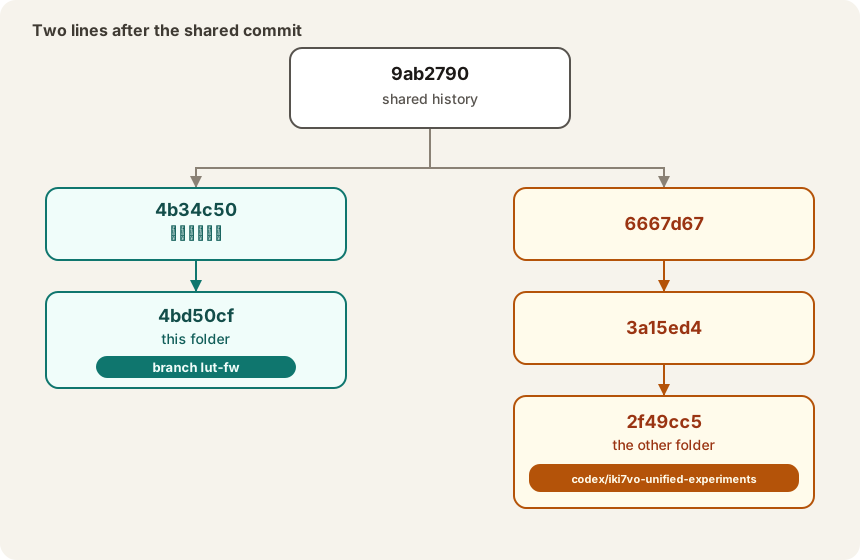
Both folders share history through commit 9ab2790 (“docs: complete worktree retirement and explain mainline impact”). After that commit, each line has its own later snapshots.
| |
A commit on lut-fw stays on lut-fw. A commit in the other folder stays on codex/iki7vo-unified-experiments. The two lines meet again only if someone later merges or rebases them.
What this folder looked like before the name
The field-weakening snapshots were already saved before any branch name pointed at them:
4b34c50— 确认工作区间4bd50cf— 记录已审阅的 LUT 弱磁原理原型。
This folder’s HEAD pointed straight at 4bd50cf. Git calls that detached HEAD: the folder is on a real commit, and no branch name is attached to it. git status then says HEAD (no branch).
Those commits were already a backup of the files they contain. The missing piece was a name you can recognize later. Creating lut-fw attached that name to 4bd50cf. It did not make a new snapshot and it did not copy the files again.
What happens on the next commit
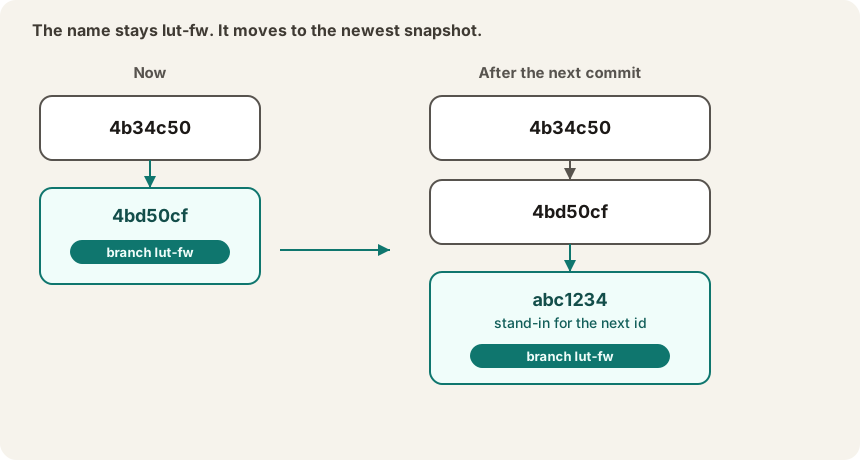
The branch name stays lut-fw. Git gives the new snapshot a new commit id. The name lut-fw then points at that new id. The older ids stay where they are.
| |
git log lists those snapshots from newest to oldest. The branch name appears once, beside the newest one. Each older line keeps its own id and its own message.
abc1234 above is only a stand-in. The real next id appears when that commit is created.